


Learn How to Use the myGMC App
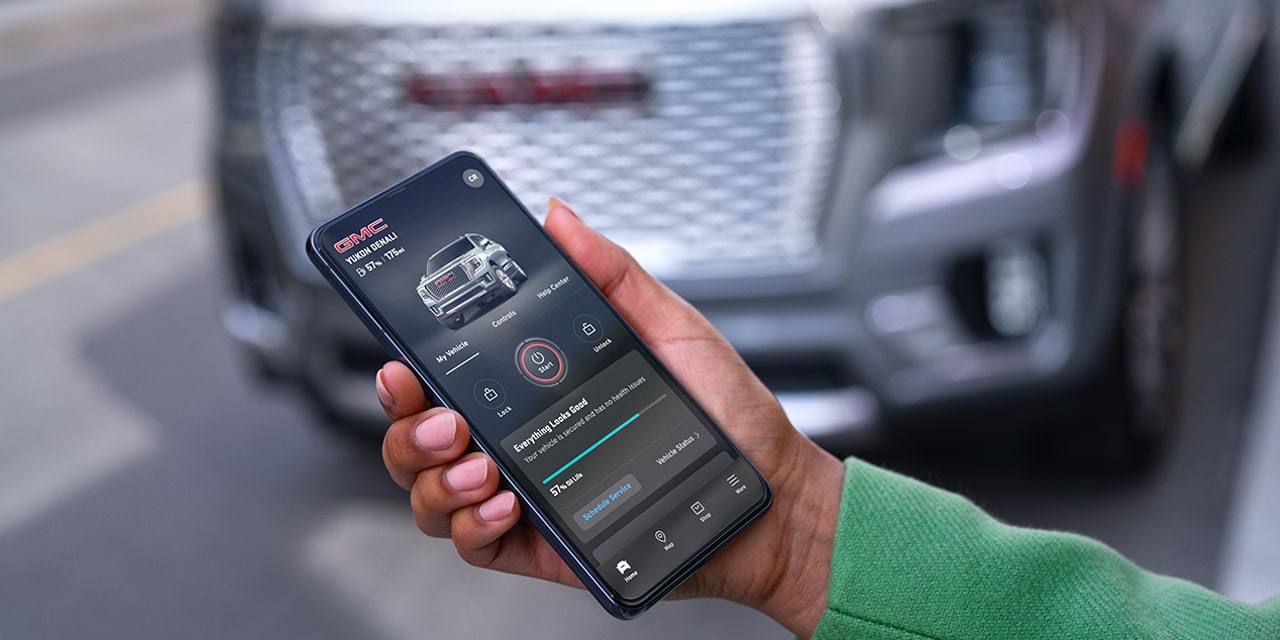
Photo Source/Copyright: GMC
Your GMC takes orders directly from your phone. Unlock it from the kitchen, warm the cabin before a cold morning commute, or verify that the doors are locked right from your desk. The myGMC app consolidates vehicle controls into one screen, and on current GMC models, core remote features come standard for eight years.
Downloading and Signing In
To get started, download the myGMC app from the App Store or Google Play. Alternatively, text “GMC” to 56000, and GM will send a direct download link, a quick shortcut if you’re standing on the dealership lot.
Open the app and choose to sign in or create an account. Important: You must use the exact email address you provided to the dealership at purchase. Complete the multi-factor authentication prompt. If your vehicle doesn’t display automatically:
- Tap your initials in the upper-right corner.
- Select Add Product, then Add Vehicle.
- Enter your VIN and requested details, then tap Done.
The email address is the step where drivers often hit a bump. That strict requirement is by design; the email links your app login directly to your vehicle’s OnStar record. A mismatch leaves you looking at an empty app.
Navigating the Home Screen
The layout organizes information into three clear zones depending on your vehicle trim and active plan:
- Top Navigation Bar: Direct access to Remote Start, Climate, Lock, Unlock, and the “More” icon (four squares).
- Widget Area: Shows live vehicle status, climate settings, and electric vehicle (EV) charge levels on supported models.
- Bottom Navigation: Icons for Home, Map, Service and Roadside Assistance, and OnStar plans.
Tap the “More” icon to favorite the controls you use daily. You can also tap your initials in the corner to access the digital Owner’s Manual without digging through your glovebox.
Core Features and EV Diagnostics
Current models feature OnStar Basics for eight years, covering vital remote actions:
- Remote Start and Climate: Cools down or heats up the interior before occupants step inside.
- Door and Trunk Release: Locks or unlocks doors and pops the trunk remotely.
- Vehicle Locator and Lights: Flashes lights or checks vehicle location on a live map.
Driving something a few years older? Remote commands still work on plenty of pre-owned GMCs through your OnStar plan, so a used Sierra or Acadia doesn’t have to miss out.
Under Vehicle Status, you can check fuel level, remaining oil life, tire pressure, and open door alerts. EV drivers, such as Sierra EV or HUMMER EV owners, get dedicated Charge Management tools to track battery levels, estimated range, and nearby charging stations.
Troubleshooting App Issues
Most app hiccups stem from mobile device settings, rather than the vehicle itself. Try these steps before calling support:
- Disable Power Saving Mode: Battery saver options often block background data sync.
- Re-authenticate: Log out and back in to force an OnStar data refresh.
- Reinstall: Delete the app, restart your device, and install a fresh copy.
- Update OS: Ensure your phone is running the latest operating system.
Picking up a new GMC? Ask our team to get the myGMC app linked before you leave the lot. Already driving one and something won’t sync? Schedule service and bring your phone along.
Frequently Asked Questions
Q: Is the app free to download?
A: Yes, the app is free on iOS and Android. Core remote commands are included for eight years on current GMC models.
Q: Why isn’t my vehicle showing up?
A: This usually indicates an email mismatch between your app profile and your dealership OnStar account.
Q: Why did oil life not reset after service?
A: The oil life monitor requires a manual reset inside the vehicle menu after maintenance.
More From Southern Buick GMC Greenbrier
2026 GMC Denali Ultimate: Features and Review
Photo Source/Copyright: GMC Newsroom If you’ve spent any time scouring dealer lots lately, you know the routine: you spot a truck trim that looks great on paper, only to discover the features you actually want are buried in expensive packages. The 2026 GMC Sierra 1500 Denali Ultimate exists specifically to eliminate that headache. Serving…
How Big Is Each Small Buick SUV?
Photo Source/Copyright: Buick Not everybody needs three rows and a turning circle like a cruise ship. Many shoppers want something they can thread through a packed grocery lot, park on a narrow city street, and still feel a little pampered inside. That’s the lane Buick’s two smallest crossovers were built for. There are…
What Is The Real GMC SLT Meaning?
Photo Source/Copyright: Edmunds Three letters, a lot of freight. SLT is the badge GMC shoppers ask about more than almost any other, yet the exact SLT meaning is less settled than you would expect from something stamped on tailgates since the 1990s. GMC has never published an official expansion of the acronym anywhere in…